
Technology
Arlo App Features, Cost and Installation Process

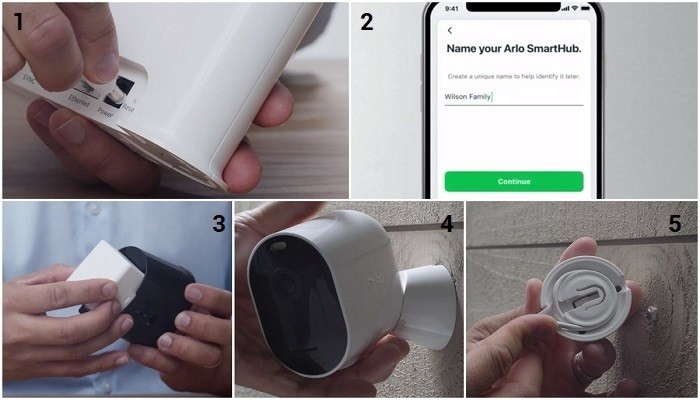
The Arlo Camera App is available for download on your tablet or smartphone. Once downloaded, you’ll need to create an account. After that, you can add your first camera to the app. The installation will guide you through the process. You can start monitoring your home and property as soon as you’re ready.
Features
Arlo camera apps provide a wealth of features to its users, including the real-time ability to see what’s going on around your home or office. You can also set schedules. The Arlo Secure App enables you to schedule automated tasks and receive notifications whenever there’s suspicious activity. This app also has a new low-power mode that helps conserve battery life.
The Arlo camera app features several valuable features, including the ability to arm and disarm your camera remotely. The app also lets you preview live or recorded videos and receive notifications when a motion-triggered event occurs. There are even options for detecting smoke and CO alarms, which means you can easily monitor your home or business.
Arlo is also pioneering new machine-learning technology. The company’s latest technology enables it to be used with wireless cameras. It also offers a full range of intelligent security cameras, including battery-powered Wi-Fi and LTE models. Other products include audio-video doorbells and smart security lights.
Cost
Arlo has several subscription plans and pricing options. The single-camera plan costs $2.99 per month, while the unlimited plan costs $9.99 per month. The Arlo Secure subscription includes 30-days of cloud video storage and features such as person and package detection, emergency response buttons, and 24/7 video recording. It also lets you connect a USB drive to your base station for recording and storing.
Arlo offers several different camera packages, including the Arlo Pro 3. The price of these packages can vary depending on the number of cameras you need. Some packages include two or more cameras and a base station that ensures a steady Wi-Fi connection. Alternatively, you can buy a single camera and add it to an existing Arlo setup.
Arlo offers a free three-month trial. Free local storage is available through the base station, but footage saved without a paid plan is not saved in 2K resolution. It also doesn’t support object detection.
Requirements
Requirements for the Arlo camera application vary depending on the camera model. Certain models allow for continuous video recording. This feature requires a cloud storage subscription. It is helpful when conversing with someone and want to document it. The Arlo camera app allows you to configure this feature.
The Arlo camera app is available on iOS and Android platforms. However, it may not work on earlier versions of the operating system. If you have an older version of iOS or Android, check with the developer about compatibility. For more information, visit the Arlo website.
To access your Arlo cameras, you must have an internet connection and a smartphone with iOS or Android. To download the Arlo app, you need an Apple or Android device running iOS 11 or Android 5.0.
Installation
To set up your Arlo camera, you must download an app on your smartphone. The app offers a variety of features for you to customize your camera. It is available for download on both the App Store and Google Play. Once downloaded, you can set the settings of your Arlo camera and view your videos from any place.
You can set the app to send notifications, record videos, or detect motion. You can also configure your Arlo camera to protect your privacy. If you’d like to monitor the areas in which you sleep or rest, you can use the Arlo app to view and control the video from anywhere you’d like.
The Arlo camera app requires an internet connection. It would help if you had a minimum upload bandwidth of 2Mbps. You’ll also need an iOS device with iOS 10.3 or higher. The Arlo app allows you to add additional users. To add a new user, you must open the settings menu in the Arlo app. You can add and remove people to your account and set permissions for each user. For any query, you can contact Arlo camera support .